
Machine data into Microsoft Fabric.
Via MQTT or Kafka.
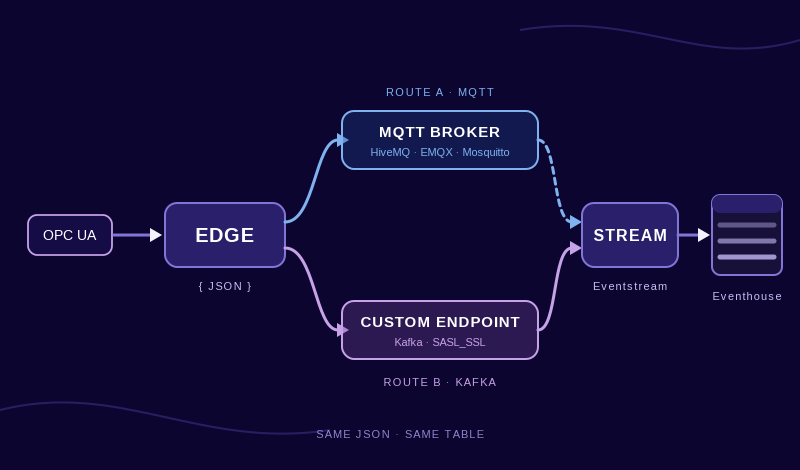
pronubes Edge reads machine values, for example via OPC UA, builds a JSON message from them and brings it into an Eventstream in Microsoft Fabric: through your MQTT broker or directly through the Fabric Kafka endpoint. In the end, every message lands as a row in an Eventhouse table.
From the controller to the table
The data already exists in the equipment. To analyze it in Microsoft Fabric, it needs a reliable way to get there.
The values sit in the equipment
State, counts, scrap, temperature and pressure are available, for example, on an OPC UA server and are to be analyzed in Microsoft Fabric.
pronubes Edge builds the bridge
pronubes Edge reads the values, combines them with the system time into a JSON message and sends it via MQTT or Kafka to an Eventstream.
Every message becomes a row
The data lands with a timestamp in an Eventhouse table. From there you start queries, Real-Time Dashboards or Power BI reports in Fabric.
How the data reaches Fabric
Four stages, two of which stay the same on both routes. Only when sending do you choose MQTT or Kafka.
- 01
Read values
pronubes Edge reads machine values, for example from an OPC UA server.
- 02
Build the message
The JSON Write building block combines the values and the system time into a JSON message.
- 03
Send
The message travels to Fabric on one of two routes.
MQTT Publish to a topic on your broker that Fabric subscribes toKafka building block via SASL_SSL to the Eventstream custom endpoint - 04
Store in Fabric
The Eventstream writes each message as a row to an Eventhouse table.
Which route fits your environment?
Both routes use the same message and the same table. They differ in whether a broker sits in between.
Through your MQTT broker
pronubes Edge publishes the message to a topic. An Eventstream in Fabric subscribes to this topic.
- Your broker: HiveMQ Cloud, EMQX or a self-hosted Mosquitto. You use the broker that fits your environment.
- One broker, several consumers: Other systems can subscribe to the same topic as well.
- MQTT v5 and TLS: In the example with username and password and TLS on port 8883.
Straight into Fabric
pronubes Edge sends via SASL_SSL to the Kafka-compatible endpoint of the Eventstream source “Custom endpoint”.
- One system less: No broker of your own, no Kafka cluster and no managed Kafka service.
- Connection details from Fabric: Fabric generates the bootstrap server, topic and connection string. You enter them in the pronubes Edge Kafka plugin.
- Outbound connection: pronubes Edge opens the connection outbound, encrypted with SASL_SSL.
SAME JSON MESSAGE · SAME COLUMNS · SAME ANALYSES
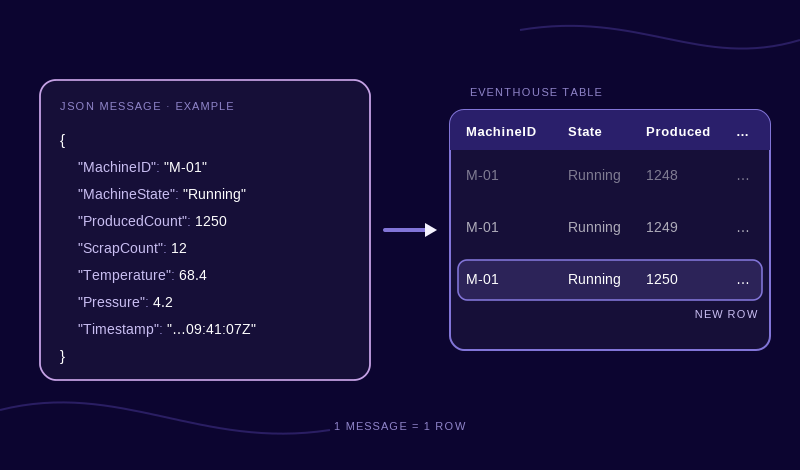
Every message becomes a row in the Eventhouse
State, counts, scrap, temperature and pressure arrive with a timestamp in an Eventhouse table. There you query the values and build analyses on top of them.
Structured message
pronubes Edge combines machine values and system time into a JSON message, for example with MachineID, MachineState, ProducedCount, ScrapCount, Temperature, Pressure and Timestamp.
Fixed columns
You check columns and data types once during setup. After that, every message lands as a new row in the table.
Keep working right away
From the table you start queries, Real-Time Dashboards or Power BI reports in Fabric.
Ready-made building blocks in pronubes Edge, Fabric in the browser
You assemble the data flow in pronubes Edge from ready-made transfer objects. You set up Microsoft Fabric in its web interface.
Ready-made building blocks
You connect OPC UA, Variables and JSON Write in the pronubes Edge flow editor, plus MQTT Publish or the Kafka building block.
Fabric in the browser
You create the workspace, Eventhouse and Eventstream in Fabric and pick the source from the list of data sources.
Verifiable in both systems
Whether data is flowing shows in pronubes Edge monitoring, in the Eventstream preview and in the table.
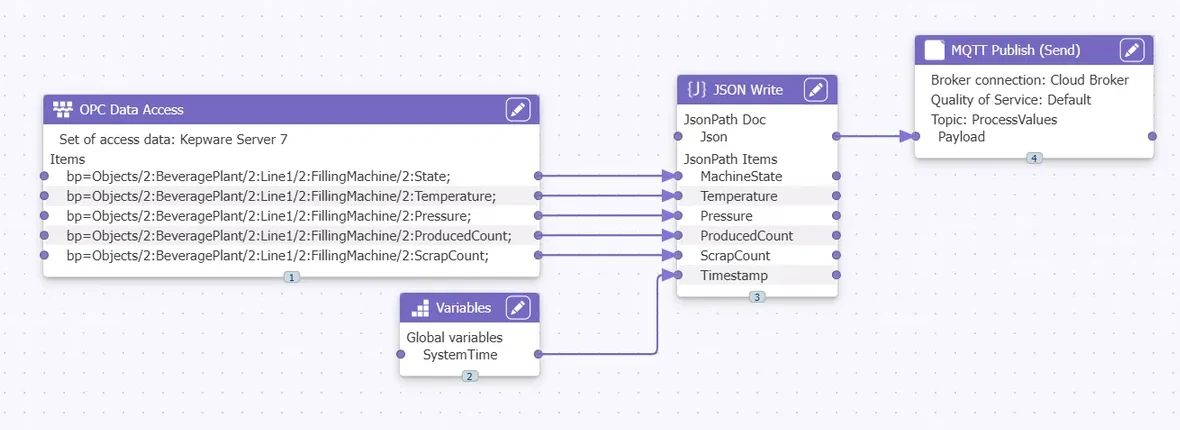
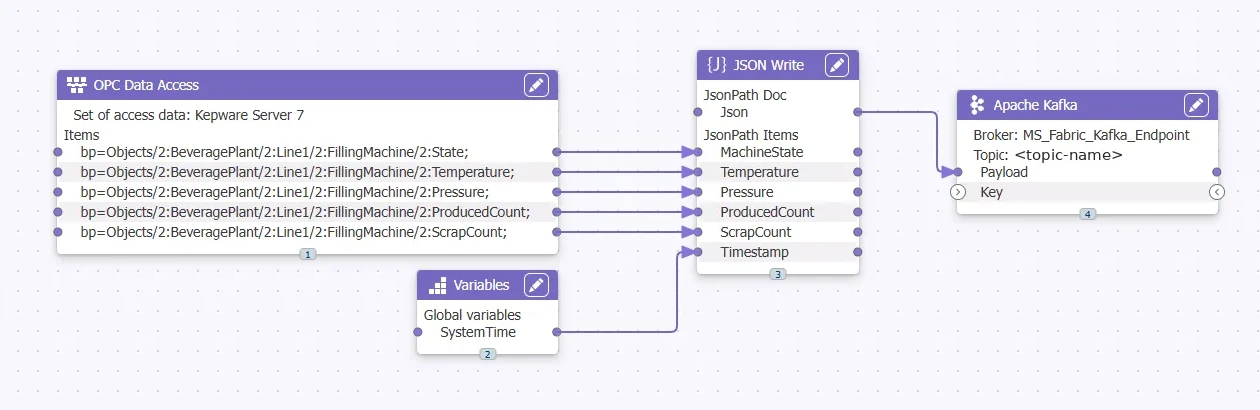
Switch the protocol, keep the data format: OPC UA, Variables and JSON Write stay the same. Only the sending building block and its connection change. Click an image to open it in full size.
MQTT or Kafka?
The message and the table in Fabric are the same on both routes. The differences lie in connection, authentication and network.
| Aspect | MQTT | Kafka |
|---|---|---|
| Intermediate system | Your own MQTT broker, for example HiveMQ Cloud, EMQX or Mosquitto | None, Fabric provides the endpoint |
| Connection | Fabric subscribes to a topic on the broker | pronubes Edge sends directly to the custom endpoint |
| Topic | Your choice, for example ProcessValues | Assigned by Fabric |
| Authentication | Username and password, TLS on port 8883 | SASL_SSL with PLAIN, username $ConnectionString, password connection string |
| Network | Fabric must be able to reach the broker | Outbound TLS connection from pronubes Edge to Fabric |
| Message and table | Same JSON message, same columns | Same JSON message, same columns |
MQTT fits if …
you already run an MQTT broker or other systems should subscribe to the same data via the topic.
Kafka fits if …
you do not want to run an additional service and pronubes Edge should only connect outbound to Fabric.
What to clarify before you start
Most questions during setup concern reachability, topic and authentication.
Fabric capacity
You need an active Fabric capacity or a trial and permissions in the workspace.
Broker reachability
Fabric must be able to reach the broker. A publicly reachable broker is the simplest setup; protected networks need additional network settings in Fabric.
One topic per source
The MQTT source in the Eventstream reads exactly one topic. Topic and MQTT version must match the pronubes Edge configuration.
Topic from Fabric
Fabric assigns the topic name. Use exactly this value, not a name of your own.
Authentication
SASL_SSL with PLAIN. The username is literally $ConnectionString, the password is the complete connection string from Fabric. Store credentials securely.
Network
pronubes Edge needs an outbound TLS connection to Fabric.
MQTT broker required
The broker is a separate service and must be in place beforehand. On this route, pronubes Edge does not send directly to Fabric.
Kafka-compatible, not a Kafka cluster
Fabric offers a Kafka-compatible endpoint, not a full Apache Kafka cluster. Do not assume Kafka administration or broker management features.
Until the first machine data arrives in the table
The guides walk you through the setup in pronubes Edge and Microsoft Fabric with screenshots.
Frequently asked questions
Do I need my own broker?
On the MQTT route, yes: an MQTT broker sits between pronubes Edge and Microsoft Fabric, for example HiveMQ Cloud, EMQX or a self-hosted Mosquitto. On the Kafka route, no: Fabric provides the Kafka-compatible endpoint through the Eventstream source “Custom endpoint”.
Which data arrives in Fabric?
Everything pronubes Edge reads and writes into the JSON message. In the example, that is machine ID, state, good and scrap counts, temperature, pressure and a timestamp from an OPC UA server.
Does the MQTT broker have to be reachable from the internet?
Fabric must be able to reach the broker. The simplest setup is a publicly reachable broker with TLS and authentication. If the broker sits in a protected network, additional network settings in Fabric are required.
Which credentials do I need for Kafka?
The bootstrap server, topic name and connection string (primary key) from the custom endpoint in Fabric. In the Kafka plugin, enter $ConnectionString as the username and the complete connection string as the password.
Are there guides?
Yes. There is a step-by-step guide with screenshots for each route: Fabric via MQTT and Fabric via Kafka.
Your machine data in Microsoft Fabric
The guides show the setup in detail. In a short conversation, we clarify which route fits your system landscape.
pronubes is a product of inray Industriesoftware GmbH. Over 30 years of industrial software from Germany. Innovative and reliable for manufacturing companies.