
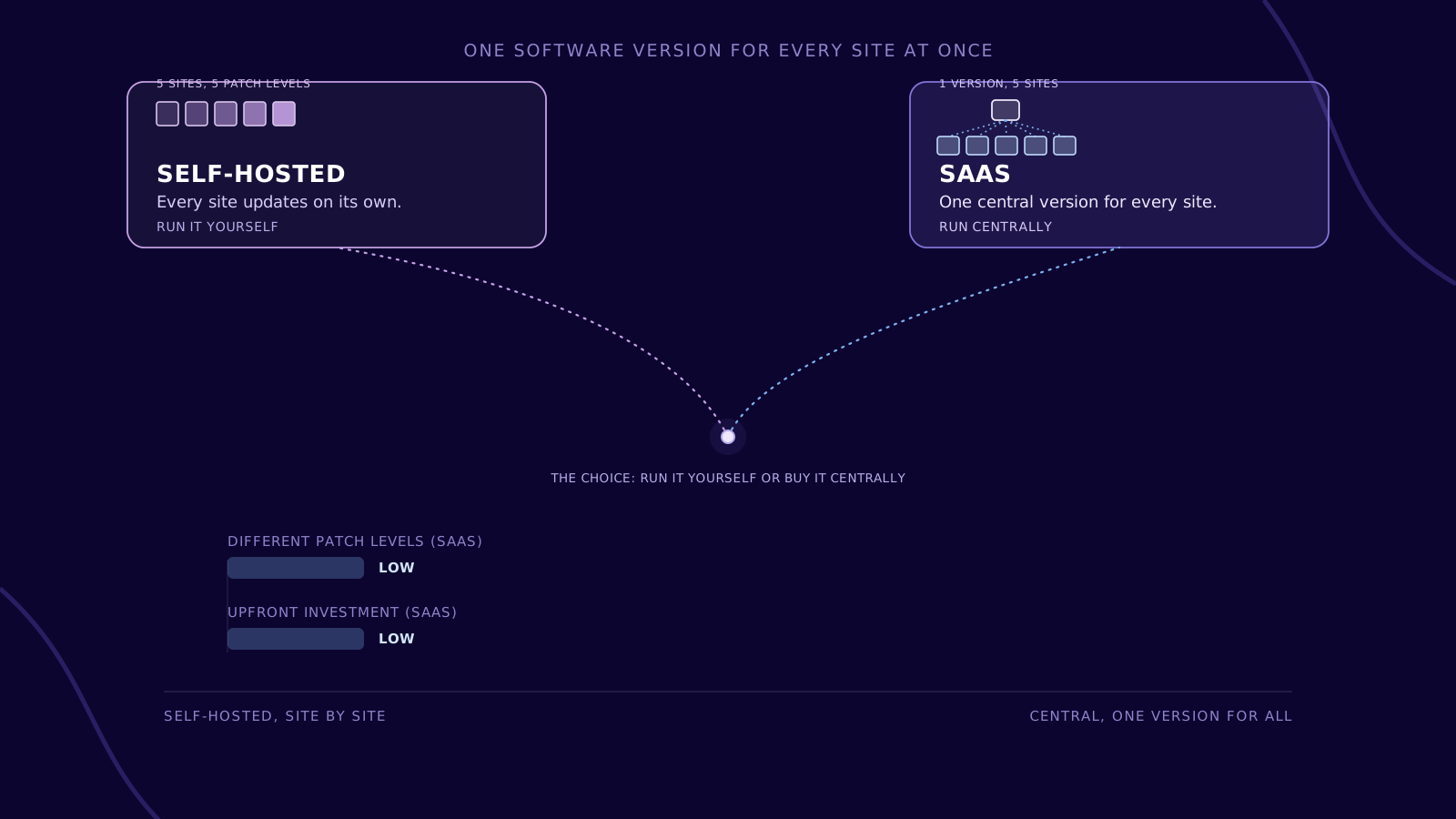
SaaS (Software as a Service) refers to software that is not installed but used over the internet: the provider runs the infrastructure, the platform, and the application, the customer signs in through a browser, and payment is usually usage-based rather than a one-time purchase. Maintenance, updates, and scaling sit with the provider — and so does part of the control over availability, update timing, and where the data lives. For manufacturing companies, that means less operational effort of their own, but a deliberate decision about which data leaves the plant, and under what terms. The most widely cited definition comes from the US National Institute of Standards and Technology (NIST). In Special Publication 800-145, published in its final version in October 2011, Peter Mell and Timothy Grance describe three cloud computing service models — Software as a Service (SaaS), Platform as a Service (PaaS), and Infrastructure as a Service (IaaS) — along with five characteristics that turn an offering into a cloud service in the first place: on-demand self-service, broad network access, resource pooling, rapid elasticity, and measured, usually usage-based billing. With SaaS, the provider runs the entire application — from the infrastructure up to the interface. The customer signs in through a browser or a thin client application and uses the software without managing servers, an operating system, or storage themselves. Anyone who runs an application themselves runs it fresh at every site: provisioning servers, maintaining the operating system, closing security gaps, updating version after version. With ten plants each running their own installation, that is ten separate update rounds with ten possible points of drift — different patch levels, different failure patterns, different people to call. With SaaS, it is one software version for all ten plants at once. Then there is the cost shape: a self-hosted installation is an upfront investment — servers, licenses, failover. SaaS turns that into an ongoing, usually monthly fee that grows or shrinks with usage, without building your own failover in the first place. The price for that is control: whoever no longer operates the system also no longer decides alone when an update lands, where the servers sit, or in what order new features appear. Most SaaS applications run as a multi-tenant architecture: one shared application and infrastructure serves many customers (tenants) at once, logically separated but running on the same underlying systems. The alternative is single-tenant: each customer gets its own, isolated instance. Multi-tenancy is why SaaS providers can ship new features quickly to every customer at once — and why customizing the software for a single customer is more constrained there than with a self-hosted installation. An SLA (service level agreement) sets out the availability the provider commits to — usually as a percentage per year — and what applies if something breaks: response time, escalation path, compensation. For a production application, this figure is not a side detail: an SLA that is fine for an office tool can fall short for an application that runs a shift schedule. SaaS updates typically arrive automatically and for every customer around the same time — often staged (a small group first, then everyone), with release notes describing what changes. Unlike with a self-hosted installation, a customer can rarely defer an update indefinitely; usually only within a fixed window. That calls for a small internal change management process of its own: who in the company reviews a new version before it goes live, and who decides when a change touches live operations. Which data is allowed to leave the plant for the cloud, and which stays local? That decision comes before choosing a provider, not after. Data processing agreement, server location, SLA, notice period — and, critically, the ability to export your own data back out again in an open format. Single sign-on, interfaces to the MES/ERP system and the namespace, network access — before the application goes into shift operation. Availability, update announcements, and usage are watched on an ongoing basis, not just checked once at signing. SaaS pays off when the task at hand is largely standard and a stable internet connection can be assumed. For a plant without reliable connectivity, for highly individual processes, or for data that, for good reason, must not leave the site, an on-premise or hybrid setup often remains the better fit. pronubes is the platform between the shop floor and IT — run as SaaS, hosted in the EU, with a data processing agreement as part of the contract. That keeps operations with the provider — and the decision of which data goes where with the customer. More on the platform No. Cloud computing is the umbrella term; SaaS is one of three service models within it, alongside IaaS and PaaS. The difference is how much the customer manages themselves — with SaaS, nothing beyond their own configuration and data. Under EU rules, the customer usually remains the data controller, and the provider is the processor. That requires a data processing agreement, not just a line in the terms of service. Without local buffering, the application stalls the moment the line drops. A store-and-forward component on site keeps collecting data and transmits it once the connection returns. Usually only within a fixed window, rarely indefinitely. That is why a small internal change management process that reviews new versions before they go live is worth having. For isolated networks without reliable internet access, for highly individual processes that a multi-tenant application cannot represent, or for data that must not leave the site for legal or contractual reasons.What Is SaaS (Software as a Service)?
Definition: SaaS
Service Model
Provider Manages
Customer Manages
IaaS
data center, network, servers, storage, virtualization
operating system, middleware, applications, data
PaaS
additionally the operating system, middleware, runtime
own applications, data
SaaS
additionally the application itself
own configuration, user management, data
Why manufacturing companies choose SaaS
How a SaaS application is structured
Trait
Single-Tenant
Multi-Tenant
Isolation
dedicated instance per customer
shared instance, logically separated
Updates
rolled out per customer
rolled out once for all customers
Cost
higher per customer
shared, usually lower
Customizability
extensive
mostly through configuration
Operations and updates in practice
What SaaS technically runs on
Four steps to adopting SaaS
Define data classes
Vet the provider and the contract
Set up integration
Monitor operations
What SaaS is not
Common pitfalls in practice
How pronubes is run as SaaS
Frequently asked questions
Is SaaS the same thing as “the cloud”?
Who is responsible for data protection with SaaS?
What happens if the internet goes down on the shop floor?
Can I postpone a SaaS update?
When does SaaS not pay off?
 What Is IT/OT Convergence? The underlying question — in case that’s where you started Keep reading
 Data-Driven Decision Making What a single source of truth changes day to day Keep reading
 Interoperability in Industry Why connectivity matters more than any single system Keep reading
A SaaS platform that still holds up during shift operation.
30 minutes on your system landscape: which data may go to the cloud, what a data processing agreement should look like, and where SaaS rollouts fail in practice.
pronubes is a product of inray Industriesoftware GmbH. Over 30 years of industrial software made in Germany. Innovative and reliable for manufacturing companies.