
In production, MCP connects AI assistants with machine, order and quality data without the AI talking directly to controllers. A sensible setup is an MCP server above the automation layer that initially offers read-only tools and ties any writing action to confirmation by a person. Access from the office or cloud network runs through a defined transition, as IEC 62443 describes with zones and conduits. What MCP is in general is explained on the page Model Context Protocol. MCP in production means: one or more MCP servers provide production data and selected functions to AI applications. The basics of the protocol are described on the page Model Context Protocol. For manufacturing, one distinction from the specification is central: prompts are controlled by the user, resources by the application, tools by the AI model. The more a tool can do, the more narrowly it must be defined. Production data is spread across many levels and systems: controllers, SCADA, MES, ERP and quality systems. The level model of the ANSI/ISA-95.00.01 standard from 2000 still describes this layering today. An AI application that is to answer questions across several levels needs access to all these sources. Since Anthropic introduced MCP as an open standard on 25 November 2024, there has been one shared protocol for this instead of individual integrations. Since December 2025, it has been with the Agentic AI Foundation under the Linux Foundation. A rough calculation also shows where MCP does not belong in production. Purely as an illustration: assume a controller runs with a cycle of 10 milliseconds and an AI application needs 2 seconds for its answer and tool call. Then 200 controller cycles pass before the answer arrives. For an analysis or a suggestion this does not matter; for a control loop it is too slow and not predictable. The numbers are a worked example, not a measurement from a project. A robust architecture clearly separates the AI application from automation. Four points decide whether a connection in production stays manageable. The sequence is similar in most projects. Start with a question that costs a lot of searching today, such as the causes of downtime on a line. Provide only the data needed for this question and link it to plant, order and time. Decide through which transition the AI application reaches the MCP server, and with which permissions. Check the answers with maintenance and shift supervisors. Writing tools are only added once responsibility and confirmation are settled. Four distinctions prevent false expectations. These points slow down MCP projects in manufacturing most often. MCP does not make an AI application more reliable, only better connected. A model can misinterpret data or name a plausible but wrong cause. In production this means: answers are pointers, not findings, and every action on the plant still needs a person who checks it and takes responsibility. pronubes provides production data for AI applications in a targeted and controlled way. The product parts have different tasks. Technically, a tool can write. Whether it is allowed to is decided by your releases and permissions. The specification provides for a human being able to deny tool invocations. In production, every writing action should be confirmed. Not necessarily. The MCP server can run in your own network. If it is used from outside, access should run via a defined transition, as IEC 62443 describes with zones and conduits. Read-only data with a clear reference: alarms, machine states, order status and quality results, each with plant, order and time. With narrowly defined tools and least privilege. An MCP server may offer different tools depending on the authorization presented. By having the application show the source: which tool, which data, which time range. Answers are pointers that a person checks, not findings. pronubes Edge can serve as an MCP server. Only what you release individually appears as a tool, and access from outside works without an inbound firewall opening.How do you use the Model Context Protocol (MCP) in production?
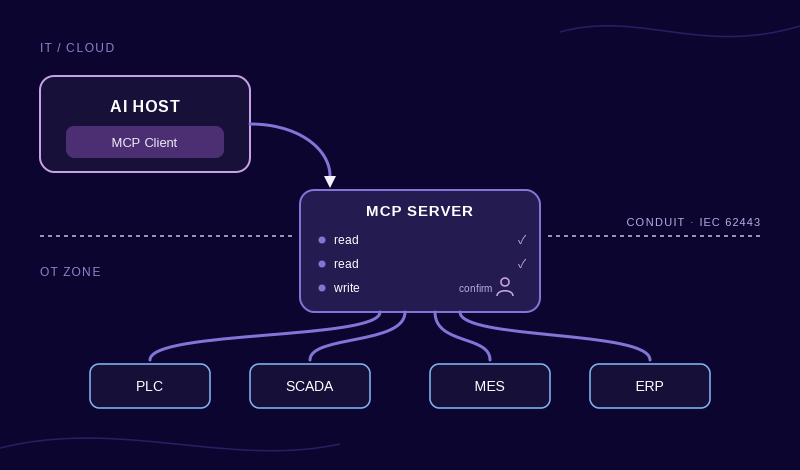
Definition: MCP in production
Use case
Typical question
Type of access
Maintenance
Why did line 3 stop last night?
Read-only: alarms, states, history
Shift handover
What happened in the last shift?
Read-only: events, key figures, notes
Quality
Which reject causes are increasing this week?
Read-only: inspection results, order data
Order control
Which orders are delayed?
Read-only: MES and ERP data
Parameter suggestion
Which setpoint could reduce rejects?
Suggestion read-only, adoption only after confirmation
Why MCP is of particular interest in production
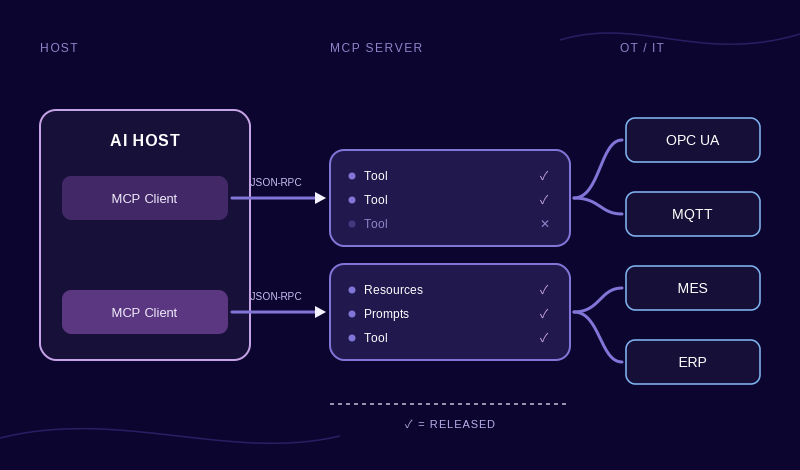
What an MCP architecture in manufacturing consists of
Building block
Task
Basis
AI application (host)
Asks questions, selects tools, shows results and confirmations
MCP specification, version of 28 July 2026
MCP server
Translates requests into access to production data, checks inputs and permissions
MCP specification: servers must validate inputs, implement access controls and rate-limit calls
Integration layer at the plant
Retrieves data from controllers and systems via their protocols
OPC UA (IEC 62541), MQTT (OASIS standard since 29 October 2014)
Zones and transitions
Separate the production network from the office or cloud network; access runs via defined paths
IEC 62443, concept of zones and conduits
Operating framework
Rules for security, availability and changes in OT
NIST SP 800-82 Rev. 3 of 28 September 2023
What matters technically
Four steps to a first deployment
Define the question
Build read-only tools
Plan access via zones
Try out, then extend
What MCP in production is not
Typical hurdles in practice
How pronubes helps
Frequently asked questions
May an AI change setpoints via MCP?
Do I need access from the cloud into the production network?
Which data is suitable to start with?
How do I prevent the AI from seeing too much?
How do I know whether an answer is correct?
AI in production starts with clear releases.

pronubes is a product of inray Industriesoftware GmbH. Over 30 years of industrial software from Germany. Innovative and reliable for manufacturing companies.